1. When thoughts refuse to gather
I run several things at once: work, my own projects, studying, the house, and moving to another country with all the paperwork that comes attached. None of them is big enough to deserve a system of its own. Together they do not fit in one head.
For a long time I thought I had a memory problem. It turned out to be a geography problem. An idea on the bus went into a voice message to myself. A thought over coffee went into the phone's notes. A deadline went into the calendar. The shopping list went onto a scrap of paper on the fridge. Anything that needed thinking through went into a notebook that lived at home and was never with me at the moment I needed it.
I never forgot things. I forgot where I had written them down.
Evenings were the worst. I would sit down to "sort it all out" and first had to collect it — from five places, each with its own logic. Half an hour went on the search, and another half on the feeling that the day was gone and the important thing was still undone. Often I did not even know which thing had been the important one.
2. Why no app ever stuck
I did try. Not two or three — a dozen, counting the ones that lasted a week. And looking back, I would not call any of them bad. Each one simply failed in a single place, and it was a different place every time.
- Team systems with boards and statuses. Built for ten people who have to agree with each other. I am one. Half the interface is about coordination that does not exist in my day: assignees, approvals, an "in review" column.
- Beautiful minimal to-do lists. A flat list. By Thursday it holds forty items, all equally important, and nothing hints at which of them fits into today.
- Note apps. Excellent for text. But a note never calls you — it just lies there waiting to be remembered.
- The calendar. The only one honest about time: in a calendar you can see that the day is finite. But you cannot put "blog ideas" or "books I want to read" in it — they have no hour.
- Big systems you configure yourself. Databases, templates, relations. A week to build — and very soon tuning the system becomes a separate job, a more pleasant one than the real work.
The pattern repeated to the point of boredom: two weeks of enthusiasm, a third week by force of will, and by the fourth everything was back in the phone's notes. Plus the feeling that this was my failing, because it apparently works for everyone else.
3. The thing none of them did
The turn did not come when I found the right app. It came when I worked out what was missing from all of them at once.
None of them told me that my plan did not fit into the day.
A day has a limited number of hours. A task list does not. Any app will happily take fourteen things for Tuesday and not move a muscle. By evening four are done, and I am "getting nothing done" again — when in fact I had planned three times more than could physically fit.
I did not need motivation. I needed an honest count: how many hours I actually have free, how many I have put on them, and how far apart those two numbers are.
4. How I started building my own
It was never a decision to "make an app". It was a page for myself, so I would stop searching in five places.
Voice came first, because a thought usually arrives when your hands are busy: on the way somewhere, in the kitchen, in the middle of something else. By the time you get the phone out, open the app, pick a project and a category, the thought has left. A button you press and speak into was the only thing that ever genuinely stuck with me.
Then came the timeline, because the list started sprawling again. Then the journal, because half my entries turned out to be thoughts rather than tasks, and they did not belong among errands. Then goals, because it became obvious that small tasks were not adding up to anything larger.
At some point I noticed I had been using it daily for months and had never once gone back to the phone's notes. That was when it stopped being a crutch and became Hop & Cross.
5. Who Hop & Cross is for
I am not going to claim it is for everyone. The opposite — the sharper the line, the fewer disappointments.
It is for you if:
- you run your own day — freelance, your own business, a creative profession, study, a flexible schedule. There is no manager above you setting priorities on your behalf;
- you have several separate areas at once, none of them big enough to justify its own system;
- things reach you while you are moving, and capturing them has to take three seconds, not three screens;
- it matters to you that your data stays on your device rather than on someone's server by default;
- you want to see not just the list, but how much of it genuinely fits into a day.
It is not for you if:
- you need a team: shared boards, assignees, comments on tasks, handing work over. That is not here and will not be — the app is built for a single user;
- you are looking for a construction kit you can bend to any process. This has considered scenarios, not empty fields;
- you need integrations with work trackers and corporate calendars.
6. What you can actually do in it
The day timeline, and an honest count
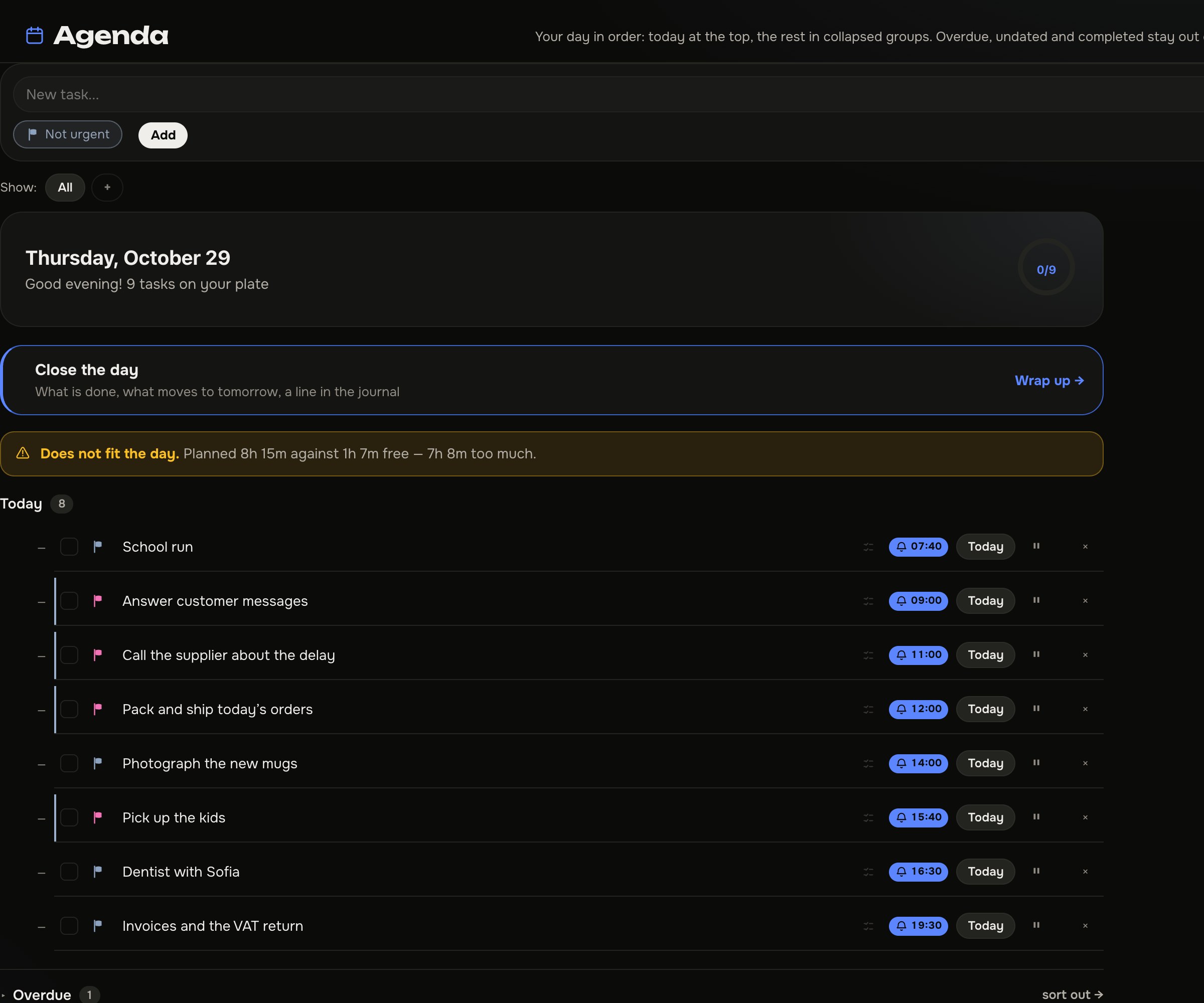
Tasks sit on specific hours. Drag a block by its edge to change the duration; a red line shows where you are now. And underneath, the app says it out loud: this many hours planned against this many free — this many too much. That one sentence did more for me than every motivational technique put together.
By voice, in three seconds
Press the microphone, say "meeting tomorrow at three for an hour", and the task lands on the timeline already carrying its date, time and duration. On Android and in Chrome the browser's own recognition handles it; on Safari and iPhone it is transcribed on the server.
Two dates instead of one
The planned date is when I intend to do it. The deadline is when it has to be done. A small thing I missed everywhere. Moving a task to tomorrow is normal. Moving a deadline is an entirely different act. When they share one field, the postponements quietly eat the deadline and you notice on the last day.
A home screen that does not frighten you
Only overdue and today at the top. The rest is collapsed into groups — still there, just not shouting. It is the same screen as in the shot above.
Lists with no dates on them
Ideas, books, restaurants, things to look at someday — everything that has no hour but should not get lost either. When something is ready, it moves into the calendar with one tap.
Journal and mood
Several entries a day grouped by date, in text or audio. You set the mood yourself with an emoji — nothing "detects" it for you. After a month the analytics show a thirty-day chart, and it sometimes reads things you cannot see from inside the week.
Goals for the year
A large thing breaks down into steps, and it becomes visible whether today's tasks move it closer or merely fill the day.
Time tracker and the estimate coefficient
Start a task with the ▶ button and the app compares what you planned with what it actually took. After three measured tasks it shows your coefficient: how systematically you underestimate time. Mine came out around double. It was unpleasant and extremely useful.
And the rest
- Shopping and finances as their own sections, so they do not tangle with tasks.
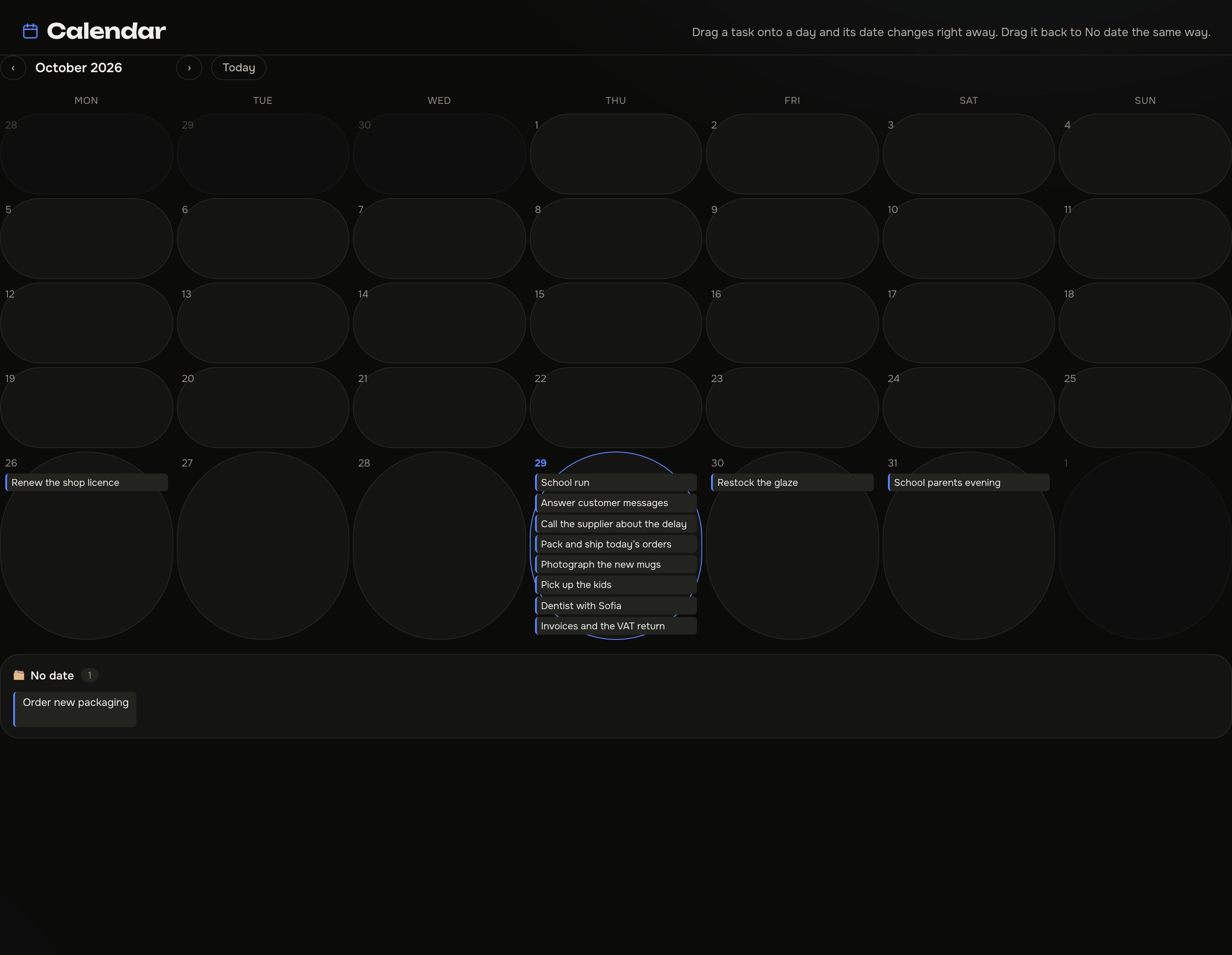
- Calendar — the week and the month ahead.
- Reminders arrive even when the app is closed.
- Repeating tasks and an archive.
- Sync between phone and computer: an email and a passphrase, from which the encryption key is derived in your browser.
- Export of everything to CSV and JSON, at any moment, with no conditions.
- Four interface languages: Ukrainian, English, Slovak, Spanish.
- Offline: tasks, lists, journal and the timeline work with no network. The internet is needed for sync and reminders.
There are AI features too — behind a key
Voice transcription on any device, "Mirror" — a reflection on your journal entries with themes and questions back to you, a summary of a conversation with what was agreed, idea evaluation, and answers to questions about productivity. Audio is processed on Cloudflare Workers AI and is not stored after transcription; nothing goes to third-party services such as OpenAI, Google or Anthropic.
7. What it does not have
This is a list I am no less proud of than the previous one.
- No ads and no trackers. No pixels, no behavioural analytics, no cookies.
- No mandatory sign-up. Open it and work.
- No cloud by default. Everything lives in your browser until you turn sync on yourself.
- No team features. No boards, no assignees, no approvals.
- No app store. It is a PWA: it opens in the browser and, if you like, installs as an icon on Android, iPhone, Windows and Mac.
8. What it costs
Tasks, goals, lists, shopping, the journal with voice recording, finances, the time tracker, reminders, sync and export are free, forever, with no sign-up.
A paid key is only needed for the AI features: €29, once — no subscription, no monthly charge, nothing to renew a year later. Up to 30 hours of transcription a month, and the key works on three devices. Details on the pricing page.
I do not think I built the best planner in the world. I built the one I stopped failing to come back to — and that turned out to be the only criterion that meant anything. If your story looks like mine, it might suit you too. And if it does not, honestly: stay with whatever already works.
Common questions
How is this different from an ordinary to-do list?
A task sits on a specific hour rather than in a list. The app counts how many hours you have free and how many you have planned, and shows the gap as a number. An ordinary list accepts any number of items and says nothing about it.
Will it work for a team?
No. There are no shared boards, assignees or approval statuses. It is a single-person tool, deliberately.
Do I have to pay?
Not unless you want the AI features. Everything else is free forever and needs no sign-up.
What happens to my data if I want to leave?
Export to CSV and JSON is always available, and on the data deletion page the server copy and the device copy can be wiped separately.
Does it work on iPhone?
Yes. It opens in Safari and can be added to the home screen as an app. Voice on iPhone is transcribed on the server rather than by the browser.
Where do I start if I am drowning in lists too?
With a single day. Put only tomorrow's things on the timeline and look at what the count underneath says. There is nothing else to set up.
Which note and task app should I choose?
It depends on where you get stuck. If you run out of room for text, take a notes app. If you work with other people, take a team system with boards. If the problem is that the list keeps growing while the day stays the same length, you need a planner that puts tasks on hours and counts how many of them actually fit. That is what I was missing in all of them, and that is what Hop & Cross does.
Is there a free task planner with no sign-up?
Yes. Tasks, goals, lists, shopping, journal, finances, the time tracker, reminders, sync and export in Hop & Cross are free forever and need no account. Only the AI features need a paid key. The interface comes in English, Ukrainian, Slovak and Spanish.
Can I add tasks by voice?
Yes, that is the main way in. Press the microphone and say "meeting tomorrow at three for an hour" — the app pulls the date, the time and the duration out of the sentence. On Android and in Chrome the browser does the recognition; on iPhone and in Safari it is transcribed on the server.
Does it work offline, and do I have to install it?
Tasks, lists, journal and the timeline work with no internet. There is nothing to install from a store: you open it in the browser and, if you like, add it as an icon on Android, iPhone, Windows or Mac.
See for yourself
Hop & Cross opens straight away — no sign-up, no ads, no obligatory cloud. If it does not suit you, nothing is left behind.
Open Hop & Cross →